latest tech gadgets and applications Headline Animator

latest tech gadgets and applications

Saturday, 1 October 2011

Google Maps Added New Feature Helicopter View of Your Route


Google has added a 3D aerial route preview option to its Google Maps product.With the new 
feature, Google Maps users can fly alongside routes to get a birds-eye view of directions while planning road trips, biking excursions, hiking trips or regular city commutes.The 3D preview feature colloquially referred to as “helicopter view” is now a part of the Google directions experience. Users simply enter start, mid and endpoint destinations to get directions as usual, and a new 3D play button will appear next to the returned directions.

“The map will switch to Earth view and automatically start flying you along your recommended route,” Google Maps engineer Paul Yang explains in a blog post. “To help you keep track of which step you are on, the current leg of the trip is highlighted in the left panel. You can also jump to a different part of the trip by clicking on a different step.”

Users can also pause the 3D preview by poking about off-route areas, all the while remaining in the 3D Earth view. They also can return to the standard two-dimensional view by clicking on the 2D button in the left-hand directions panel. 3D route previews, on first glance, appear to mash up the Google Earth and Google Maps experiences quite nicely. Take a trip of your own and let us know your thoughts in the comments.

Thursday, 29 September 2011

Facebook is Planning To Launch iPad App And Project Spartan Soon!!!!

Reports says that Facebook is gearing up to launch the much awaited iPad app and Project Spatran as early as next week and it could even be at the iPhone 5 launch event on October 4th.Project Spartan is an HTML5 based mobile application platform for Facebook apps, which would work on mobile Safari.

Facebook’s iPad app is about to launch. That too has been ready to go for a while now, but it has been held up by some internal back-and-forth between Apple and Facebook. And Project Spartan has been waiting on that iPad app. Earlier this week, Mashable reported that Facebook’s iPad app would launch at Apple’s iPhone event this coming Tuesday. 

For what it’s worth, we’ve heard Facebook is actually planning to launch the iPad app at their own iPad/Spartan event on Monday. But they’re still discussing all of this with Apple. And Apple has been well known to change things at the last second. It is possible that they want Facebook to launch this on stage at their event to showcase some of the new HTML5 capabilities of iOS 5 (which will also be formally unveiled at the event).

Thursday, 22 September 2011

What is Google Wallet?

Google’s mobile payment system, Google Wallet, is now available to the public — for people who use Sprint Nexus S 4G phones and Citi MasterCards or Visa cards at least. The near-field communication and contact-less payment system was expected to launch this summer.Google Wallet — along with Google Offers — is built on an open platform that combines multiple credit cards, loyalty programs and offers at the point of sale. Payment is made by swiping your smartphone at checkout. Essentially, Google is turning your phone into your wallet.

The Google Wallet service must be associated with a Google account to begin using it. After agreeing to terms and conditions and entering a PIN, you can start the process of provisioning your cards to your account.So far the service only works with Nexus S 4G phones on Sprint; people with these phones will receive over-the-air updates Monday and will see a new “Wallet” app. It also only works with Citi Master Cards and Google Prepaid Cards, which can be filled using any other credit card.

Update: Visa has announced that Visa customers can also use Google Wallet.Eventually Discover and American Express will work with the app as well, Google said Monday.The system made its debut in May and was tested in select markets. Just last week MasterCard, a launch partner, held another press event in New York City to show off other future-of-payment technologies, including the ability to make purchases by simply waving at your TV.

How To Fix Overheating & Fan Noise After Upgrading to Mac OS X 10.7 Lion with SMC Reset

A fair amount of users are reporting that upgrading to Mac OS X Lion has caused their Macs to run hotter in general and their fans to constantly engage, creating excessive and unusual fan noise. For users who have just performed an upgrade from 10.6, this is usually because of Spotlight and the mdworker & mds process combination, which irons itself out over the course of an hour or so.

If waiting it out hasn’t resolved the heat and fan noise for you, or those Spotlight processes aren’t running, you might want to try resetting the System Management Controller, or SMC. This seems to be particularly effective for MacBook Pro and MacBook Airs that are running hot with considerable fan noise after the Lion installation.
Fix Fan Noise & Heat in OS X Lion by Resetting SMC

For MacBook, MacBook Pro, and MacBook Air models with internal batteries:

  • Shut down your Mac 
  • Plug in the MagSafe adapter 
  • Press and hold Shift+Control+Option+Power button at the same time 
  • Release all keys and buttons simultaneously 
  • Press the power button to turn on your Mac as usual 
Apple notes that the little LED light on the MagSafe adapter may change colors or states, or even briefly turn off when you reset the SMC, which could be an easy way to tell if it’s be done successfully.Resetting the SMC is a fairly common trick to fix some of the quirkier power and battery related problems on a Mac, and in many cases it works. If all else has failed, try this out, it just may solve your heat and fan noise issues with Lion.

Note: Anytime the SMC is reset you will typically lose custom power settings, so be prepared to go back into System Preferences to readjust Energy Saver settings again.

Hurrey ! Google Plus Finally Allows Public To (Sign Up Now)

Google Plus is finally available for all users and everyone can signup with Google Plus now. Over the past 90 days, they were developing applications and adding new features and Google Plus finally comes out with more than 91 improvements, since its launch. It is really a good news for those people waiting to get their hands on Google Plus to get a better experience than other social media website like Facebook and Orkut. Earlier, people had to invite a particular user to sign up for Google+ but it is open to all.

Now, you can sign up through the official website at google.com+ or plus.google.com. Open these links and you can see that sign up (Create an account) option is now available and you can use it to get a Google Plus account. If you already posses a Google account or using any Google service then you can use the same ID and password to sign in to Google Plus.


Some of the most popular features on Google Plus:
Hangouts:
We can use this feature on Google Plus for get live video chat with many peoples on same time face-to-face and we can share lots of things during Google hangout with friends like Video, Music, Games and many more. Finally Google hangout improve and now available on Android 2.3+ devices with front-facing cameras (and iOS support is coming soon).

+Search: It was also most popular feature on Google Plus because with the help of this tool, we can search people on Google Plus and their posts too. Just type what you’re looking for into the Google+ search box, and it will return relevant people and posts, as well as popular content from around the web.

Google+ API for developers: Last week, Google announced API for application developers. But today Google released one more API specially for hangout application developers. If you are a developer and want to develop application for Google Plus and hangout, then it’s your day and you can get full information on Google Plus API by visiting the Google official Google+ Platform blog.


Multiple Gmail Sign-in for Mobile

Google has upgraded Gmail for mobile with a couple of long-awaited features, including multiple sign-in.The feature, which has been present in the desktop version of Gmail for about a year, lets users sign into several Gmail accounts at the same time — very convenient for those who often need to switch between one or more personal and business accounts.

To sign into another account, click on the account switcher at the bottom of the app’s thread list. Then you can choose to either sign into an another account, sign out of all accounts, or switch between the accounts you’ve already signed into.

Other new features of note include a vacation auto-responder, which can now be set up from the mobile version of Gmail, and creating a special mobile signature that makes it clear you’re responding to an email from a mobile device.

To try the new features, simply go to mail.google.com on your smartphone or tablet’s browser.

Monday, 19 September 2011

How to Configure Automatic Login in Windows 8

For enabling an automatic login to Windows 8, you need to configure your user account. The procedure is similar to Windows 7 with some minor changes:

1. To configure a user account, you need to configure netplwiz settings. To open netplwiz in Windows 8, you need to log into the user account. You are taken to the Metro UI start screen. Hit Win+R or go to Search from the new Start Menu, select Select Apps and type netplwiz in the search bar. This should open the User Accounts screen on the Desktop.

2. Now, you can see all available users in Windows 8. Now, select user from the list that you want to auto login during Windows 8 startup and remove tick mark from “Users must enter a user name and password to use this computer” option.


To enable this feature, you must enter password for the selected user. So enter selected user password and press OK button for apply.


It is complete yet simple process to enable automatic login on Windows 8. It is a good option but raises some serious privacy and security concerns for both the user and the computer for a mulitple access computer. So, I think you should try this tweak only if you have a single user computer or private computer.

Saturday, 17 September 2011

Hot: Now Carry your Battery on your wrist


Chargers are God’s way of telling us that nothing lasts for ever and every battery has a limit. But scientists are very tenacious and work very hard in order to assure you constant access to technology.

This is why the Wrist Band Portable Battery that comes in a white and classy design is perfect for all those who want to be on the safe side and keep a couple of extra batteries on …their writs.

It has 6 connectors working with most brand mobile phones, PSP, NDS and a rechargeable Li-ION battery. Your gadgets will be recharged in no time so that you can finish doing important things without any worries.

Source: www.chinavasion.com

Tricks : How To decrypt and clone copy-protected DVDs

A big problem with DVDs is that they’re awfully prone to scratches, and a scratched DVD is a non-playing DVD.Unfortunately, most DVD movies are copy protected or CSS encrypted in order to prevent you from copying them. It’s alleged purpose is to stop piracy, but it also keeps a legitimate owners from copying movies who want to backup their DVDs in order to protect them from scratches. 


I for one, like to make copies of the movies and games that I own, just to have a backup. I’m also a fan of copying DVDs to my media-center hard drive for faster, easier viewing. But you can find it hard to do so unless you have a good DVD cloning software that is capable of decrypting copy-protected DVDs.


How to Rip and Burn (Clone) Copy Protected DVDs? These DVD copy software contains a DVD ripper or DVD decryption utility, which de-scrambles the DVD’s copy protection or CSS encryption and allows the software to burn a perfect copy of any DVD… including copy protected DVDs.With current technology, copying DVD movies ( even CSS encrypted and copy protected DVDs ), is a very simple one-step push button operation… if you have the right DVD copy software. Really… it’s so easy that anybody can easily make an EXACT CLONE of any dvd within seconds!

How to Copy/Crack a Decrypted (Protected) DVD within Seconds! DVDFab DVD Copy is an amazing DVD ripper/clone/burner software that is very efficient if you want to clone a DVD, rip DVD quickly, decrypt copy protected, transfer and playback to a compatible-device – all in a flexible and fast way.Unlike traditional DVD rippers, which convert movies into mobile-friendly video files, DVD Copy is designed explicitly for copying DVDs to blank discs and/or your hard drive (in ISO format). It can perform 1:1-ratio copies or add compression (great for fitting movies onto single-layer discs.

DVDFab has a built-in CSS decyptor (which we love), supports multiple languages, removes region codes, retains or omits bonus material, restores defective or scratched DVDs and supports most configurations.To top it up, the program offers eight different copy modes, including the option to split a DVD onto two blank discs (again, useful for single-layer media). It also has the option to remove FBI warnings and make the copied disc jump directly to the main menu (bypassing all the previews).

Thursday, 15 September 2011

Sexy NOVA N800 Tri Band Watch Cell Phone

I’ve found the NOVA N800 Tri Band Watch Cell Phone very interesting, and, although it’s big, it can be used by men and by women too; if you run outside, play football, basketball, skate or do any activity, it’s the perfect solution not to carry a phone, too.
This watch cell phone has Tri band function for a great coverage and clean reception in most geographical regions and with the high definition PC camera you can obtain good pictures made with the phone.

Features:
• Support memory card
• MP3 / MP4 player
• World time
• Calendar
• To do list
• Alarm clock
• Calculator
• Stopwatch
• Shortcuts
• E-book reader
• Currency converter
• Unit converter
• Bluetooth
• Voice recorder
• PC camera
• WAP
• MMS


hacker can hack the battery module and stop the charging of your Mac

What Apple Macbook Battery Hacking is About? 
Charlie is just someone who wants his Mac to be safe from hackers. He is not out there to make Apple feel embarrassed. He wants Apple to go one step further, and make its devices foolproof. “I don’t want to be their adversary. I want to have them fix stuff — and I want them to get better“, Charlie said.If you have a software problem or if someone hacks your device, you can reboot and have your system running like a horse again. But what to do when someone can affect the hardware with the use of a software? Charlie Miller has found a way to shut down the charging system in your Mac by playing around with the software. 


 How Apple Macbook Battery Hack Works? 
There is a dedicated system for charging your laptop. There is a constant interaction between a computer and its battery module. The battery module is responsible for calculating how much more battery the computer needs, when to cut the power off. And for running that battery module, Apple has given software.

This software has passwords, so that a user does not rupture it in any way. Charlie Miller just goggled for those passwords and found them. He hacked his Mac, entered the passwords and changed the software according to what he wanted it to do. And now he can do many queer things.He can change the software in a way that the computer doesn’t know whether the battery is connected to it or not. And your Mac won’t get charged, and you will just keep checking the battery wire connectivity to your Mac. And will keep checking if the battery is plugged in properly to the electric socket. 


Implications: If someone is heartless enough, he can force your Mac to blow. And it’s not in theory. If someone changes the battery software in such a way that the computer keeps getting charged, then it can blow up, leaving you with burns.
 

Solution: 
The solution is that Apple should change the default passwords which are keyed in when the Mac is manufactured. Charlie presented his hacking technique at the Black Hat security conference. And he thinks that changing the passwords will stop this kind of Mac hacking. So, if next time you are going out to buy a Mac, then do open your wallet with a pinch of concern.


How To Delete iTunes in Mac OS X 10.7 Lion


There are two ways to delete the app under Mac OS X 10.7: the easy way using the GUI, and quick way for advanced users using the command line.
Remove iTunes Using the Finder 

  • Quit iTunes 
  • Navigate to /Applications and locate iTunes app 
  • Select iTunes and hit Command+i to “Get Info” on the application 
  • Click on the Arrow next to “Sharing & Permissions” to reveal the access panel 
  • Click on the lock icon and authenticate with your administrator password 
  • Under “Privilege” set both instances of “everyone” to “Read & Write” 
  • Close out the Get Info window and drag iTunes to the Trash, and then empty the trash 
Remember that without another version of iTunes available for Mac OS X to use, you will likely encounter errors in various places, plus it will make it impossible to sync and backup iOS hardware like an iPhone or iPad. Basically, if you don’t have a good reason to be removing iTunes, such as to downgrade or ditch the colorized version, than you should keep it around.

Delete iTunes via the Terminal
This is a quicker method for users who are comfortable with the command line:
Launch the Terminal (located in /Applications/Utilities/ Type the following commands to kill iTunes:
killall iTunes
Now kill the Helper process:
killall "iTunes Helper"
Now to delete the actual application, use this command:
sudo rm -rf /Applications/iTunes.app/
Authenticate the sudo command, note there is no warning for the actual deletion of the app
As usual, be careful with the rm command because if you mistype the file path, you will delete other things without warning. This is why we recommend the command line for more advanced users only.

Wednesday, 14 September 2011

Google brings out Flight Search

Google introduced a web-based tool that lets you find and book flights.Google provided what it called an “early look” at the service on Tuesday with flights to and from a handful of cities, including New York, Chicago, Los Angeles, Dallas and Minneapolis. Participating airlines include Delta, JetBlue, Continental and American.

Flight Search is a more user friendly version of a service Google launched in May. It offered flight info when you typed “flights from [a city] to [another city]” in the Google search window.Google made its first formal foray into that segment last July with the $700 million purchase of ITA, developer of the airfare search and pricing system QPX that is used by major airlines.

A video below explains the service further:

Apple Plans To Release iOS 5 GM In The Last Week of September

Apple is planning on having iOS 5 GM provided to it’s overseas suppliers sometime during the week of September 23 to September 30, which is in line with the only publicly announced “fall” release date specified by Apple. The GM build, which stands for Golden Master, will be then be preinstalled on all iPads, iPod touch, and iPhone models, including whatever the next-gen iOS devices happen to be. 


This information comes from a reputable analyst who supplied a research note to AppleInsider, which also reemphasizes that next month will be the public release of the next iPhone: A release of iOS 5 to assemblers the week of Sept. 23 means its likely finalized hardware units for the new iPhone and iPod touch will begin to ship at the end of September. With an estimated 10 to 12 days for shipping, the two new devices are likely to be available by mid-October

Releasing the GM at the end of this month would also give app developers plenty of time to ensure compatibility with the finalized version of iOS 5. The current iOS 5 dev release is beta 7, which is considerably more stable and speedy than prior versions.iOS 5 adds over 200 new features to the platform and has significant ties to Apple’s upcoming iCloud service, which is expected to launch alongside the new mobile operating system.

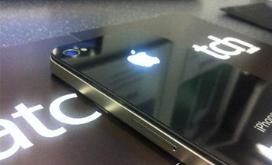
Make iPhone Logo Glowing With This Mod


Are you annoyed by that all those MacBooks strut around with their glowing Apple logos, and their little brother, the iPhone, has to settle with a regular, dull Apple icon on its back? Grieve no more, as a UK company called iPatch has developed a modification that will make your iPhone’s logo glow majestically, just like in the photo on the right.

According to iPatch, the illuminated logo can be made to glow in different colors by applying filters. It glows when the screen is on; it also starts glowing when you receive a call or a message. It also does not noticeably increase battery use, nor does it increase heating of the back of the case.

Unfortunately, applying this modification yourself might prove a daunting task, as it requires of how the iPhone functions “on the circuitry level.” The folks at iPatch will be glad to do it for you starting mid-October for an estimated price of £50-£100 ($79-$158), plus shipping.

Monday, 12 September 2011

Apple Introduces The new version of Mac OS X 10.7.2 includes iCloud beta

Apple continues to list no known issues with the latest build, and asks developers to focus their testing on AddressBook, GraphicsDrivers, iCal, iChat, iCloud, Mac App Store, Mail, MobileMe, Safari, Spotlight, and Time Machine.Apple had also released iTunes 10.5 beta 8 and iWork for iOS beta 3 few days back and iOS 5 beta 7 on August 7th. Meanwhile. Apple has also reopened iTunes Match beta service for additional developers over the weekend.

iTunes Match beta testing has now been expanded to additional developers in the United States. iTunes Match stores your music library in iCloud and allows you to enjoy your collection from anywhere, any time, on your iPhone, iPad, iPod touch, or computer. Any of your songs, including music you've imported from CDs, that matches with the 18 million songs in the iTunes Store will become available in iCloud and will play back at iTunes Plus quality (256 Kbps DRM-free AAC) — even if your original was of a lower quality.

iTunes Match is a new service that Apple had unveiled along with iOS 5 and iCloud at the WWDC 2011 Keynote address in June. It allows users to store their entire music collection (up to 25,000 songs), including songs that they've ripped from CDs or purchased from anywhere else in iCloud.Apple is widely expected to release iOS 5 along with Mac OS X 10.7.2, iTunes 10.5 and iWork for iOS couple of days before or along with iPhone 5 launch, which is expected in the first half of October.

Best 4 Apps For Mobile Wi-Fi

If you reached this article searching for some of the best Wi-Fi Finder App for iPhone or Android, then its your lucky day. Admit it or not, it’s official: we’re addicted to smartphones. One of the most common uses of our mobiles is to surf the web, download apps, send emails and update social networking sites. If you look carefully you’ll notice that all of these popular activities need an internet connection.

Nearly all smartphones, particularly more recent ones, have the ability to connect to a Wi-Fi network such as a public hot spot or even a home internet connection. However, the problem arises when you need to access the internet but there’s no Wi-Fi connection within range – what do you do?There are several apps available from app stores on Android and iOS that can help you access the internet when you need it most, whether they turn your mobile into a modem or guide you to the nearest hotspot.

JiWire Wi-Fi Finder  
This app does pretty much what it says on the tin – it finds Wi-Fi connections. There are nearly half a million Wi-Fi hotspots around the world, yet when you need one, you can never find one.The Wi-Fi Finder app allows you to search for free and paid hotspots that are in your area, call the location, and even get directions to it. Available for free on Android and iPhone.

Hacker Declairs he can exploit Windows Update

The hacker who calls himself "Comodohacker" said this week that he could have used digital certificates stolen from a Dutch firm to issue fake updates to Windows PCs. If Comodohacker's assertion is accurate, he would have been able to push malware to Windows machines via the operating system's Windows Update service. Microsoft said that was impossible.

Comodohacker, who claims to be a 21-year-old Iranian, has taken credit for several attacks against certificate authorities, or CAs, the organizations and companies authorized to issue SSL (secure socket layer) certificates. In two of those attacks -- of Comodo in March and more recently of DigiNotar -- certificates were fraudulently generated. Among the 531 certificates stolen in the hack of Dutch-based DigiNotar were several that could be used to impersonate Microsoft's update services.

Comodohacker said he could exploit those certificates. "I'm able to issue Windows update[s]," Comodohacker claimed in one of several statements he has posted this week on Pastebin. "Microsoft's statement about Windows Update and that I can't issue such update is totally false!" Last weekend, Microsoft said that the certificates stolen from DigiNotar weren't enough to deliver actual updates.

Amazon launches e-book subscription service soon

Amazon is considering the launch of a subscription service for e-books and is currently in talks with book publishers, a Wall Street Journal report said on Sunday.According to the report, “people familiar with the matter” describe Amazon’s plan as “a Netflix Inc.-like service for digital books, in which customers would pay an annual fee to access a library of content.” Users would be able to download content to their computer, smartphone device and tablet.


It’s not certain how much progress has been made with the talks, the source said. Also, it seems that not everyone is behind the proposed service, with some publishing executives worried it might “lower the value of books and because it could strain their relationships with other retailers that sell their books.” The WSJ report says that the online retail giant would begin with a digital library of older books. The service would be rolled out to Amazon Prime customers, who currently fork out $79 a year for fast shipping, as well as access to a digital library of thousands of movies and TV shows, which can be streamed to a computer or mobile device. The plan is to offer a limited number of free e-book downloads per month.

Sunday, 11 September 2011

Facebook Introduced ‘Smart Lists’ to Beat Google+ Circles

Facebook has been busy revamping its security and privacy measures this summer, to varying degrees of success. And as much as the site likes to protest that the launch of Google+ has nothing to do with these overhauls, more than a few of the changes seem to echo the purpose of its new competitors Circles tool.


But none more than the soon-launching Smart Lists. Mashable has obtained images (check them out after the break) showing that Facebook has begun testing this new application, which filters your News Feed to better target the information you share. Smart Lists automatically group your contacts into three groups: Work colleagues, old classmates, and those who live within 50 miles of you. The idea is that, much like over at Google+, you can post updates for certain groups of people instead of blasting your entire network with information that only applies to small segment of your friends.


And before users complain about Facebook pre-determining these lists, manual Friend Lists aren’t going anywhere. Users are still able to create their own contact groups, labeling them things like “Family,” or “Soccer Team” and choosing what information is or isn’t sent their way. There will also be a renewed focus on Friend Lists, with more explanation from Facebook on how best to construct your own lists (with wording very similar to how Google+ describes Circles). 


Facebook has been tweaking how its Friend Lists tool has worked, but it’s remained a seldom-used feature of the site. When Google+ launched, critics praised its Circles application for doing something Facebook hadn’t – when in reality, it was really just doing it better. An auto-list might encourage users to create their own friend groups, or at least use the pre-determined lists to limit the audience to their News Feed posts.

Smart Lists hasn’t officially launched yet and is only rolling out to a handful of users, but already there’s been some backlash. Facebook has been flooded with copy-pasted posts announcing the site is not limiting your News Feed on its own, showing you posts from friends you interact with most. We assume this could be related to a mass launch of Smart Lists. Regardless, if you’d like to change it, here’s how:

  • Scroll to the bottom of your News Feed.
  • Click “edit options.”
  • Select “All of your friends and pages.”
  • Here you can also see whose posts you’re hiding.