latest tech gadgets and applications Headline Animator

latest tech gadgets and applications
Showing posts with label iphone. Show all posts

Wednesday, 14 September 2011

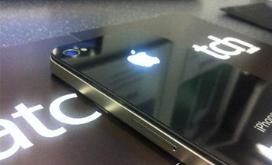
Make iPhone Logo Glowing With This Mod


Are you annoyed by that all those MacBooks strut around with their glowing Apple logos, and their little brother, the iPhone, has to settle with a regular, dull Apple icon on its back? Grieve no more, as a UK company called iPatch has developed a modification that will make your iPhone’s logo glow majestically, just like in the photo on the right.

According to iPatch, the illuminated logo can be made to glow in different colors by applying filters. It glows when the screen is on; it also starts glowing when you receive a call or a message. It also does not noticeably increase battery use, nor does it increase heating of the back of the case.

Unfortunately, applying this modification yourself might prove a daunting task, as it requires of how the iPhone functions “on the circuitry level.” The folks at iPatch will be glad to do it for you starting mid-October for an estimated price of £50-£100 ($79-$158), plus shipping.

Monday, 12 September 2011

Best 4 Apps For Mobile Wi-Fi

If you reached this article searching for some of the best Wi-Fi Finder App for iPhone or Android, then its your lucky day. Admit it or not, it’s official: we’re addicted to smartphones. One of the most common uses of our mobiles is to surf the web, download apps, send emails and update social networking sites. If you look carefully you’ll notice that all of these popular activities need an internet connection.

Nearly all smartphones, particularly more recent ones, have the ability to connect to a Wi-Fi network such as a public hot spot or even a home internet connection. However, the problem arises when you need to access the internet but there’s no Wi-Fi connection within range – what do you do?There are several apps available from app stores on Android and iOS that can help you access the internet when you need it most, whether they turn your mobile into a modem or guide you to the nearest hotspot.

JiWire Wi-Fi Finder  
This app does pretty much what it says on the tin – it finds Wi-Fi connections. There are nearly half a million Wi-Fi hotspots around the world, yet when you need one, you can never find one.The Wi-Fi Finder app allows you to search for free and paid hotspots that are in your area, call the location, and even get directions to it. Available for free on Android and iPhone.

Friday, 9 September 2011

Google Launched an iPhone App For Blogger

Google has finally launched an iOS app for Blogger, giving the blog network’s millions of users a simple way to write, manage and publish posts from their iPhones.The app, available for iOS users 3.2 and up, is rather straightforward. It allows users to compose and publish blog posts complete with photos and geotagging. It also lets users view and edit their published and draft blog posts. It mimics the simplicity of the Blogger for Android interface, though. Users can also manage multiple blogs from the interface.


While the app works for the iPad, it only works in compatibility mode. Hopefully an iPad app is in the near future.This is the first official Blogger app for the iPhone. BlogPress created an unofficial app that Blogger endorsed, but an official app has been long overdue. The blogging service, once the world’s largest blogging service, has been overshadowed by WordPress, Tumblr and more lightweight competition. Google recently started investing in an overhaul of the service in an attempt to make Blogger relevant once again.

What do you think of Blogger and its new iOS app? Let us know in the comments.

Thursday, 1 September 2011

Voice Brief Application for iPhone

Voice Brief transforms your iPhone into a talking assistant of sorts. The $4 productivity app from Dong Baik reads content from your iPhone aloud, freeing you from looking at your phone to find out the day's news, weather or more. Voice Brief is an outstanding, fully featured app that truly can make you more productive. Voice Brief can read many things aloud-your email, calendar, the weather, blog posts, stock prices, and even your friends' Facebook and Twitter posts. Once you've selected what you'd like Voice Brief to read, you then select how you'd like it to read, too.

If you've ever heard your Mac talk to you in its default "Alex" voice, you already know what the voices sound like in Voice Brief. Thankfully Voice Brief gives you a choice of four different voices: two American women, an American man and a British man (English is the only supported language at this point). You can adjust the speed of each voice, too. Voice Brief uses voices in two different ways: the "announcer" voice reads headlines and gives the weather forecast, for example. The "reporter" voice actually reads the contents of emails or blog posts. Of course you can set the same voice for both readers-or disable one or the other-if you'd like.

 
No matter which voice you choose, you're liable to be taken by the smoothness with which Voice Brief reads your emails, favorite blogs, weather forecast and more aloud. The app even supports multitasking, meaning you can pop into another app on your iPhone or iPad as Voice Brief continues reading in the background. The result is one very slick app.Voice Brief suffers from only minor irritations. 

There are times you'll wish you have more control over what Voice Brief reads. For example, although I asked Voice Brief not to read comments on posts in my Facebook news feed, I found that the app would sometimes read those comments anyway. Other times, it can be difficult to understand what Voice Brief is reading, especially during blog posts containing photos (with captions) or long bulleted lists read in rapid succession. These are relatively minor issues, however, and really don't detract from the overall polish of this app.

Wednesday, 31 August 2011

MoboTap’s Dolphin browser is Now Available for iPhone

It's already popular with Android smartphone owners, and from today users of Apple's mobile devices can also try out MoboTap's Dolphin browser.Having been downloaded to Android smartphones some nine million times, it’s safe to say that the Dolphin Browser has been something of a success for developer MoboTap. And from today the free app is also available for Apple’s mobile devices.

The new iOS app brings with it many of the features enjoyed by Android users and will compete for attention with the likes of iPhone’s native
Safari browser and the third-party Opera Mini option.A popular feature of MoboTap’s browser not found on others is its gestures capability. This enables you to navigate the web with a quick swipe of the finger. For example, make a “v” gesture on the screen and you’ll be swiftly taken to the bottom of the web page.

You’ll find a gesture list within the app showing you the swipes you need to make in order to perform functions such as refresh a web page, open a new tab and add a bookmark. You can even add new gestures for new functions – how about a “D” for the Digital Trends homepage?The browser also features what its developers call Webzine. This allows you to populate a page with thumbnails from a list of more than 100 popular websites. Click on a thumbnail and you’ll be taken to a simplified version of the webpage, drawn from the site’s RSS feed, allowing for a less cluttered reading experience.
 

Other features include:
Speed Dial: “Put favorite sites on Speed Dial. Stop looking around in your bookmarks. Forget about typing out long URL. Just put your favorite sites on Speed Dial.”
 

Tabbed browsing: “Real tabbed browsing. Feel like you are on a desktop. Add tabs within Dolphin just like you would on a desktop.”
 

Sidebar: “We implemented two side bars for you to access Bookmark and Tool Bar without going through complicated clicks.
 

”The new iOS app is compatible with iPhone, iPod touch, and iPad devices and requires iOS 4.0 or later.

Thursday, 25 August 2011

Kiano 4: iPhone Keyboard


The Kiano 4 is a slide out keyboard choices that can be connected to an iPhone. This distinctive keyboard can rest on the rear panel with the iPhone and provides only a half-inch thickness for your iPhone. It connects by way of Bluetooth and arrives having a Li-Ion battery that may provide energy for up to five hours of continuous typing or 30 hours on standby. The Kiano 4 is accessible at iNature for US$100.

Wednesday, 10 August 2011

Facebook Launches Messaging App for iPhone & Android

Facebook has unveiled Facebook Messenger, an Android and iPhone app dedicated to sending messages and texts through the world’s largest social network.
 

The mobile app, which is now available in the Android Marketplace and iOS App Store, is the direct result of its March acquisition of group messaging app Beluga. Facebook Messenger is the first mobile application the company has developed and released outside of its official Facebook app.

“It’s a mobile app about real-time communication. All messages are sent and received in real time no refreshing required.The app, much like Beluga, is simple and straightforward. Once users log into Messenger with their Facebook credentials, they’re taken to a screen with all of their recent Facebook chats and messages. Users can jump into any of their past conversations or create a new one. Messages can either be sent via Facebook Messenger or via SMS. 


Users can also send photos to their friends with the app. It also lets you give message threads a name, for easier organization.One of the key elements of Messenger is its alert system. Users can choose to receive alerts for new messages, or they can turn them off. They can also delay alerts for an hour or until 8:00 a.m. the next day. The alert settings can be tailored for individual message threads or for all messages through Messenger.

Facebook admits its official mobile app will eventually have all of Messenger’s functionality, but the company believes that having an app dedicated to quick messaging on the Facebook platform is something that will benefit its millions of mobile users. And it could give other group messaging apps like GroupMe a run for their money.