Why did the beautiful CIA operative seduce the handsome yet ruthless former KGB agent in Chapter Four? And why didn't the mysterious clairvoyant use her psychic powers to pinpoint the serial killer's location?Questions arise when you're reading a book. Many readers--if the author were near--would likely seek additional clarification on key plot points or characters. And non-fiction readers might pepper the writer with questions pertaining to the book's thesis, or to correct a factual error. A new Kindle feature makes this reader-author interaction a lot easier. Called @author, it allows readers to ask questions while reading a Kindle book, or from an Amazon Author Page.

Amazon will tweet your question to the author, and post it on his or her Amazon Author Page. Brevity is essential, however, as questions from the Kindle are limited to just 100 characters. For longer inquiries, go to the writer's Author Page.
The @author program is in beta release, and a few well-known writers are participating, including Susan Orlean (The Orchid Thief) and Robert Kiyosaki (Rich Dad, Poor Dad). Amazon has a list of participating authors here. Sorry, you can't query dead authors--not yet, anyway.
Samsung didn't get the memo when Dell axed its 5-inch phone, because it has introduced its own 5.3-inch smartphone-tablet crossover called the Galaxy Note. The slender Android 2.3 device blurs the line between phones and tablets and comes with a bundled stylus for those who don't want to use their fingers.The Samsung Galaxy Note (whatever happened to the new naming convention?) sports some impressive features: It runs on an unspecified dual-core 1.4GHz processor; has 1GB of RAM; carries an 8-megapixel HD camera on the back and a 2-megapixel front-facing camera; and comes with either 16GB or 32GB of storage.The most astounding aspect of the Note is its screen. It's a 5.3-inch Super Amoled display with a resolution of 1280 by 800 pixels (that's 285 dots per inch--the iPhone 4 has 326 dpi). Despite the size of the display, Samsung managed to keep the Galaxy Note very svelte, stuffing all of the components into a 9.65mm-thin, 0.39-pound-heavy case.
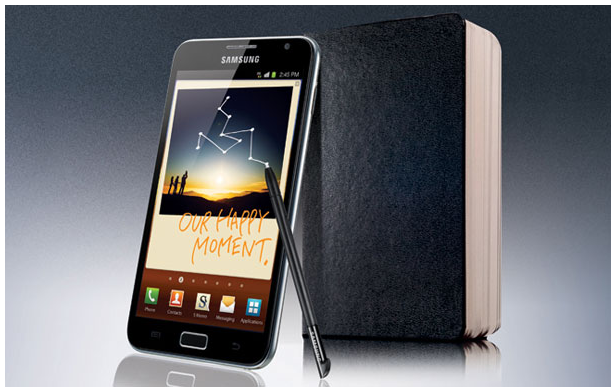
Pricing will be an important factor in the Note's success. Will it be priced as a smartphone, or as a tablet? The Streak 5 was handicapped by its price, which was $100 more (with a two-year contract) than most smartphones ($199), and some $50 more (unlocked) than the cheapest iPad. Samsung hasn't said when or for how much the Galaxy Note will retail, but it has announced that it's working on two versions of the phone--one with HSPA+ and one with 4G LTE.
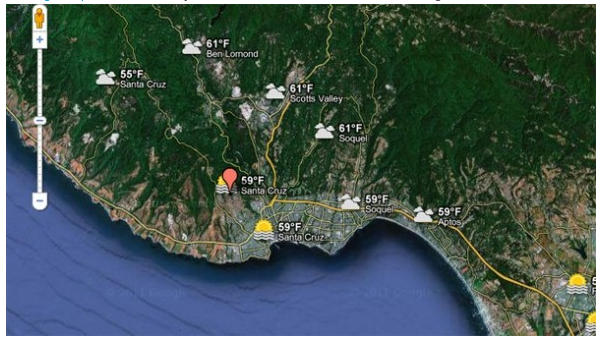
Checking out weather in your local area is always useful especially if you’re planning to go on a road trip, and now Google has added a new addition to its Google Maps service that lets you check weather around the world with a single click.
Now with Google Maps, you can see weather information in your local area, in your state, or anywhere in the world. This is extremely useful if you’re planning to go on a vacation, and all that you need to do in order to find weather info is to go to the Google Maps, select new weather layer from the top right corner and type in the name of the city and get that city’s current weather. Of course, by clicking the weather icon next to the city and you’ll get additional info such as humidity, wind speed and forecast for next four days all in one place.
Weather reports in Google Maps is a welcome addition, and if you’re planning to go on a vacation, make sure that you check this new feature out.

The offline capabilities will become available both for individuals who use Gmail, Docs and Calendar, as well as for organizations who use them as part of the Google Apps collaboration and communication suite in workplaces and educational institutions. Once installed, these offline applications will create an icon in the Chrome browser interface for launching them when users aren't online. The Gmail application will have its own user interface separate from the Gmail web interface, while the Docs and Calendar applications will trigger their web application's interface and work in the background.
In all three cases, users will get access to a subset of the web applications' features. For example, in Docs it will be possible to view documents and spreadsheets, but not yet edit those documents. In Calendar, users will be able to view events and RSVP to appointments. Previously, Google provided offline access to these applications via its Gears browser plug-in, but the company stopped developing it last year. It has been possible to use Gmail and Calendar offline through Gears in Internet Explorer 8 and Firefox 3.6, but not Docs.
 Voice Brief transforms your iPhone into a talking assistant of sorts. The $4 productivity app from Dong Baik reads content from your iPhone aloud, freeing you from looking at your phone to find out the day's news, weather or more. Voice Brief is an outstanding, fully featured app that truly can make you more productive. Voice Brief can read many things aloud-your email, calendar, the weather, blog posts, stock prices, and even your friends' Facebook and Twitter posts. Once you've selected what you'd like Voice Brief to read, you then select how you'd like it to read, too.
If you've ever heard your Mac talk to you in its default "Alex" voice, you already know what the voices sound like in Voice Brief. Thankfully Voice Brief gives you a choice of four different voices: two American women, an American man and a British man (English is the only supported language at this point). You can adjust the speed of each voice, too. Voice Brief uses voices in two different ways: the "announcer" voice reads headlines and gives the weather forecast, for example. The "reporter" voice actually reads the contents of emails or blog posts. Of course you can set the same voice for both readers-or disable one or the other-if you'd like.
 No matter which voice you choose, you're liable to be taken by the smoothness with which Voice Brief reads your emails, favorite blogs, weather forecast and more aloud. The app even supports multitasking, meaning you can pop into another app on your iPhone or iPad as Voice Brief continues reading in the background. The result is one very slick app.Voice Brief suffers from only minor irritations.
There are times you'll wish you have more control over what Voice Brief reads. For example, although I asked Voice Brief not to read comments on posts in my Facebook news feed, I found that the app would sometimes read those comments anyway. Other times, it can be difficult to understand what Voice Brief is reading, especially during blog posts containing photos (with captions) or long bulleted lists read in rapid succession. These are relatively minor issues, however, and really don't detract from the overall polish of this app.
No matter which voice you choose, you're liable to be taken by the smoothness with which Voice Brief reads your emails, favorite blogs, weather forecast and more aloud. The app even supports multitasking, meaning you can pop into another app on your iPhone or iPad as Voice Brief continues reading in the background. The result is one very slick app.Voice Brief suffers from only minor irritations.
There are times you'll wish you have more control over what Voice Brief reads. For example, although I asked Voice Brief not to read comments on posts in my Facebook news feed, I found that the app would sometimes read those comments anyway. Other times, it can be difficult to understand what Voice Brief is reading, especially during blog posts containing photos (with captions) or long bulleted lists read in rapid succession. These are relatively minor issues, however, and really don't detract from the overall polish of this app.
Flickr has introduced a new privacy feature called geofences that allows users to create geographic privacy settings for photos’ location data. With the new feature, Flickr users can draw a circle on a map to designate a geofence and then choose a geographic privacy setting for that area. Users can create up to 10 geofences, and previously uploaded photos are also updated with the new geo-privacy settings.
“You might want to create a geofence around the your ‘home’ or ‘school’ that only allows ‘Friends and Family’ to see the location of the photos you geotag in that area by default,” Flickr said in a blog post on the update. “So the next time you upload a photo with a geotag in the radius of a geofence, it will follow the geo privacy setting you’ve designated for that hotspot.”
Flickr, a Yahoo property, has been characterized as slow to innovate, especially amid the mobile photo-sharing boom. The geofences feature, however, addresses one of the primary concerns associated with geotagged images — Flickr claims to have more than 300 million geotagged photos and videos on its site — and should receive a welcome reception from the service’s users.

That’s a sharp contrast to some of the brutish 4-inch+ Android phones we’ve seen in the past couple years, and its sleek profile will no doubt be an attractive feature to potential U.S. buyers. The Medias N-04C has enjoyed a good deal of success in Japan, where it’s sold more than half a million units.It’s expected that the Medias will receive a spec bump prior to its Stateside launch. The original Japanese version featured an 800MHz processor, a 480×854 FWVGA display covered with a sturdy slab of GorillaGlass, a 5.1MP rear-facing camera with LED flash, 802.11 b/g/n Wi-Fi, Bluetooth, and Android 2.2.
At the very least, the processor would likely be updated to something at or above the 1GHz mark and Android 2.3 Gingerbread flashed before making its debut on Verizon — where the N-04C is expected to launch because of NEC-Casio’s previous dealings.The Japanese version also includes a TV tuner, e-wallet functionality, and an infrared port. Don’t count on those additional features making the trip — they might be staples in Asia, but they’re not commonly found on U.S. phones.